Service · Websites & Web Systems
Websites &Web Systems
Your website is your best salesperson. Works 24/7. Never takes a vacation.
Most companies think of their website as a "digital business card." We think differently. Your site is the first — and sometimes last — touchpoint with a customer. It decides whether they stay or leave. Buy or look for a competitor.
In 2026, a site has to be fast, beautiful, clear, and adapt to every screen. But also something less talked about: it has to be built for an environment where AI bots crawl it and decide whether to surface it in their answers. We build from scratch. No templates. No shortcuts.
01 / What we build
What we build
From a brochure site to a full platform. From a landing page to a marketplace. Each one built for its specific goal.
02 / Which site do you need
Brochure site, landing page, store or web system — which one do you actually need?
"Website development" covers five very different products, each with its own timeline and budget. Before anyone talks design, it helps to know which one you are building.
| Type | When it is the right call | How we build it |
|---|---|---|
| Corporate / brochure site | A company that needs a professional presence, service pages and leads — without complex business logic. | Next.js + headless CMS, green Core Web Vitals, SEO and GEO from day one. |
| Landing page / campaign | One message, one audience, one action. Paid campaigns, launches, A/B tests. | Static and extremely fast, full measurement, variants for testing. |
| Online store | Selling products directly. Catalog, cart, checkout, shipping and inventory. | Shopify or WooCommerce when that is enough; a custom headless store when the experience or integrations demand it. |
| Web system / web app | Users log in and get work done: customer portal, admin system, internal tool, SaaS. | Fully custom — frontend, backend, permissions, integrations. At this point it is software development in every sense. |
| Platform / marketplace | Two or more sides (suppliers and customers), payments, ratings, complete business flows. | Architecture planned for growth, an operational back office, and a clear v2 roadmap. |
Not sure where your product lands? That is exactly the first question in the discovery meeting — and it drives the budget more than any design decision.
03 / The approach
We don't build on templates.
Not because we're snobs — because templates don't serve you. They serve the company that sold them. A custom-built site runs faster, is easier to maintain, and actually reflects who you are.
04 / Web systems and portals
A system for customers, employees or partners?
A web system is not a website with a login. It is a place where people get work done: submit, approve, compare, report. The first distinction is who the user is and what the business action is — because that decides the sign-in, the permissions and what has to be simple.
| System type | Who the user is | The business action | What it specifically requires |
|---|---|---|---|
| Customer portal | Existing customers — consumers or businesses — outside the organization | See a status, submit a request, pay, download a document, open a ticket | Simple sign-in, self-service, self-explanatory screens; zero training |
| Employee portal / internal system | Employees in different roles, sometimes field staff too | Run a process: draft → approval → execution → closure, with management reports | Role-based permissions, multi-step processes, organizational sign-in (SSO) |
| Partner / B2B portal | Suppliers, distributors, agents — other organizations with their own users | Submit a bid, update stock, order, report — against your data | Separation between organizations, user management on the partner side, a data interface (API) alongside the screens |
| Admin / back-office system | The team that operates the service | See everything, handle exceptions, approve, export | An audit log, search and reports, admin permissions separated from end users |
What a portal includes — in practice
How does the system connect to the business?
A web system almost never stands alone. Every integration has to answer three questions: what passes through, how often and in which direction, and what happens when the other side is unavailable.
| System | What passes through | Frequency and direction | What happens on failure |
|---|---|---|---|
| CRM | Customers, contacts, tickets | Two-way, real-time or every few minutes; the source of truth for the customer is defined up front | The system keeps working on the data it has; updates are queued and sent when the connection returns |
| ERP / accounting | Orders, invoices, inventory, price lists | Usually orders go out, inventory and prices come in; sync cycles are defined | An order does not vanish — it is marked 'pending sync' and someone sees it |
| Legacy system / files | Historical data, spreadsheets, documents | A one-off migration at the start, sometimes periodic imports until the old system is retired | An exceptions report: which rows were not imported and why, so they can be fixed and rerun |
| Messaging (email / SMS / chat) | Alerts, confirmations, codes | Outbound only, immediate | Automatic retry; the message is logged in the system even if the external provider fails |
| Organizational sign-in (SSO) | The user's identity and role | On every sign-in | No sign-in without authentication — but a clear message and a way to reach support |
Users and permissions — an example
A table like this is usually the first document we write together. The example here is invented — a service portal for a company with business customers — not a client's data.
| Role | Sees | Creates / edits | Approves |
|---|---|---|---|
| Customer (a user at the client organization) | Only their own organization's tickets, orders and documents | A new ticket, a new order, contact details | — |
| Manager at the client | Same as customer, for all users in their organization | Adding and removing users in their organization | Orders above a defined amount |
| Service rep | Tickets and orders of the customers assigned to them | Ticket status, replies to the customer, internal notes | — |
| Team lead | All tickets and orders, workload per rep | Assigning customers to reps, reply templates | Credits and cancellations |
| Management | Aggregate reports; no access to individual tickets by default | — | — |
| System admin | Everything, including the audit log | Roles, permissions, integration settings | Permission changes for other users |
Testing, migration and handover
What this looks like in a real system
KICK AI is a real-time web system with two faces: a mobile-first game for players and an admin platform for the operators — rounds, formats, content and live control — on the same backbone, with permissions that keep each side where it belongs. Dividandy adds a third: a back office that runs tournaments, wallets and growth for a product that lives on iOS, Android and the web. Both case studies describe how the operating side was built into the system.
05 / Sites and systems we built
Websites and web platforms we built — and that work
Three web products you can open today: a two-sided tender platform, an employee-onboarding system and a real-time gaming layer. What we built in each — in the full case study.

E-COMMERCE · FASHION
PROPR — An online store. Tailored to measure.A custom commerce platform for a premium loungewear brand, from the collection through checkout and delivery.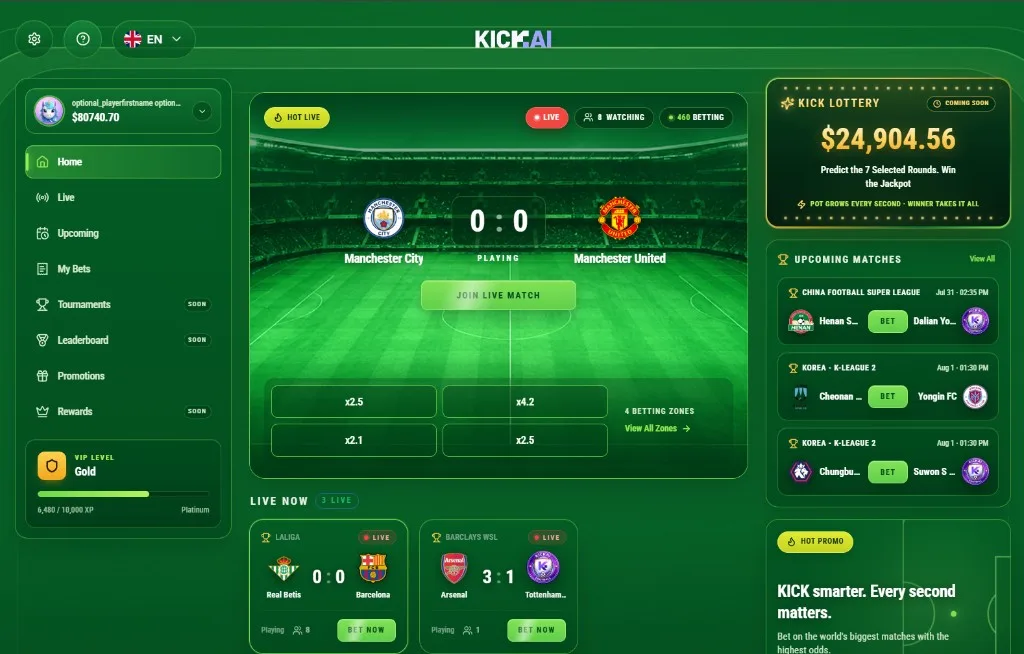
SPORTS GAMING · REAL-TIME
KICK AI — Football gaming. In real time.An interactive sports gaming platform combining live football broadcasts, real-time predictions and a fast-paced gaming experience.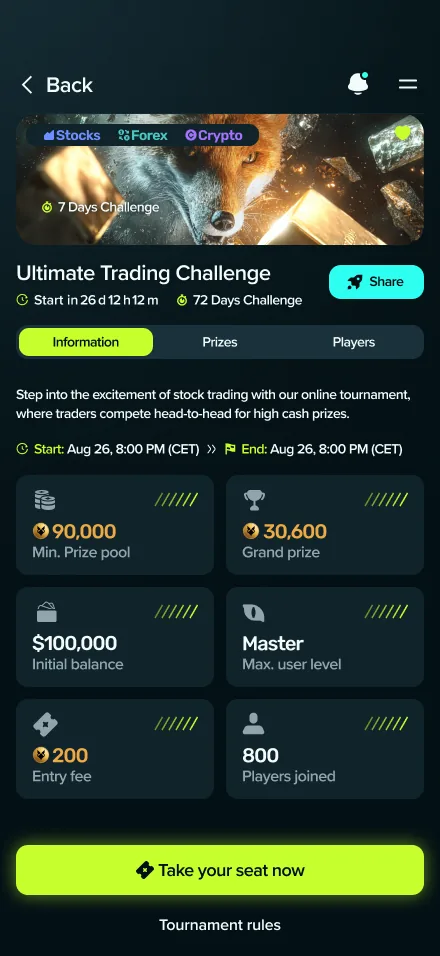
FINTECH · GAMING
Dividandy — Financial markets. As a competitive game.A mobile-first gaming platform that transforms financial markets into a real-time competitive arena: tournaments, virtual capital, live market data and leaderboards.
06 / Technology
Our stack
A full stack — from modern frontend, through headless CMS and commerce, to CDN, search and analytics. We pick the right tool for each site.
Frontend
- Next.js
- React
- Vue
- Astro
- Remix
- TypeScript
CMS
- Sanity
- Contentful
- Strapi
- Headless WP
E-commerce
- Shopify
- WooCommerce
- Medusa
Hosting & Edge
- Vercel
- Netlify
- Cloudflare
- AWS
Search
- Algolia
- Meilisearch
- Elasticsearch
Analytics
- Google Analytics
- Plausible
- PostHog
Performance
- Edge Functions
- CDN
- Image Optimization
- ISR
SEO & Schema
- Schema.org
- OG
- Sitemaps
- Hreflang
07 / How we work
How we work
- 01
Understand the goal
Brochure, sales site, platform? Who's the audience? What's the single most important action? Everything else builds from there.
- 02
Structure & UX
Sitemap, information architecture, user flow. Three clicks max to the goal.
- 03
Custom design
Our designers start every site from a blank Figma page. No templates, no "what everyone else is doing."
- 04
Frontend & backend dev
Two-week sprints. Something to see at the end of each one. No surprises, no "we'll show you in two months."
- 05
SEO & speed optimization
Pre-launch: Core Web Vitals, accessibility, on-page SEO. All green. No compromises.
- 06
Launch & migration
Move from staging to production. Domain, SSL, analytics — all handled.
- 07
Ongoing support
A site isn't "ship it and forget it." It needs updates, new features, optimization. We stay with you.
08 / Who it's for
Who this is for
09 / Why us
Why us
FAQ
Frequently asked questions
There is no honest flat price for a website or web system: the budget follows scope. The drivers are the number of templates and unique screens, whether there is business logic and user accounts behind the pages, which integrations are in scope, and how much content and design exist before we start. We scope the work first, then give a fixed, itemized quote — what is included, what is excluded and what would change the number. We give a precise quote after one discovery meeting.
A brochure site — 4 to 8 weeks. A more complex site — 2 to 4 months. A web platform — 3 to 6 months.
It depends. WordPress is great for content sites and blogs. For platforms, web apps, or advanced experiences — custom development with Next.js gives a faster, more secure, more precise result. We'll tell you straight what fits.
Yes. For us, design and development are one process. A full in-house UI/UX team.
UI/UX design — how our design process worksTechnical SEO — yes, built into every site we ship. Content optimization and authority building — ongoing work we can manage with you.
SEO + GEO — organic search and visibility in AI enginesYes. We build sites that appear in answers from ChatGPT, Claude, and Perplexity. In some niches it's already 30% of traffic — and only growing.
We recommend modern hosting (Vercel, Cloudflare, AWS) and help with setup. The control and ownership stays with you.
Yes. Multilingual is something we do a lot: per-language URLs and hreflang, translations workflows, right-to-left support where needed, and dedicated SEO per language.
Monthly maintenance packages available — security updates, backups, small features, fixes. Or on-demand.
You do. No "buts." Code, domain, hosting accounts — all yours.
Yes. Sometimes a smart upgrade beats building from scratch. We'll audit, recommend, and execute.
Legacy upgrades — modernizing old sites and systemsYes. With a headless CMS for easy editing, and a structure Google and AI both love.
The user and the business action. A customer portal serves people outside the organization — they have had no training, they compare you with competitors, and their experience is part of the product; so it needs simple sign-in, self-explanatory screens and self-service. An internal system serves employees who can be trained, with multi-step processes, role-based permissions and management reports. Often both run on the same engine — with a separate interface for each audience.
With a migration plan written before development, not after it: what moves, what stays in the old system, how mismatched fields are mapped, and how you verify everything arrived — usually with a trial run on a copy of the data, and sometimes a parallel-run period in which both systems operate side by side. The quality of the existing data is what determines the size of this work, which is why it is checked early.
Keep reading
- GuideHow a web system development estimate is builtWhat an estimate is made of, what moves it up or down, and how to read a range. No prices — a method.
- GuideHow do you choose a software development company for your next project?What a strong engineering team looks like, which questions to ask in the first meeting, and why to plan for version ten — not just version one.
- Case studyCase study: KICK AI — a real-time sports gaming platformAn interactive gaming layer on top of live football broadcasts: short prediction rounds, a pitch-based interface, mobile-first UX and an operational admin platform.
Let's talk
Need a website that actually works?
A 30-minute intro call. No strings attached. We'll figure out together if we're a fit.
Straight. To the point. On time.