AI automation for business
AI automation that turns manual work into an intelligent system
Onezero Labs finds the manual, repetitive work that costs you most and designs AI automation around it, wired into the systems your business already runs — from the process audit to a stable system in production.
Discovery · Engineering · Integration · QA · Security · DevOps
01 / What it means in practice
What business automation actually changes
Business automation turns repetitive manual tasks into connected, measurable processes. Instead of copying data between systems, handling documents by hand, or waiting on one person at every step, you get a flow that does the work, handles the exceptions, and escalates only what genuinely needs a human decision.
- Built for companies with processes that carry real volume
- Not a template — a system wired into your existing infrastructure
- From operational teams to complex back office systems
- Suited to processes that cross several people and several systems
02 / How it flows
From intake to your systems
- 01
INTAKE
Sources: Documents, Inbox, CRM, Manual entry.
- 02
AI LAYER
Processing: the model reads, classifies, extracts and drafts.
- 03
VALIDATE
Checks: business rules and confidence thresholds decide what passes automatically.
- 04
APPROVE
Human sign-off: exceptions and high-impact actions wait for a person.
- 05
SYSTEMS
Outcome: ERP updated, Task completed, Report and audit trail.
03 / The symptoms
How much of your team's day still goes into manual work?
04 / Process x-ray
Which processes can be automated?
Four processes that recur in almost every business. For each one: how it runs today, what can be built instead, and the measures that tell you whether it actually worked.
Documents & invoices
Documents arriving from every channel, keyed in by hand and waiting for sign-off.
| Today | After automation | What we measure |
|---|---|---|
| The document arrives by email, text message or scanner | Automatic intake from every channel into a single queue | Time from receipt to a booked record |
| Someone opens it, reads it and types the fields into the system | Fields extracted and the document classified by type | Share of documents processed without human touch |
| Mismatches only surface at month-end close | Values checked against the order, contract or payment terms | Errors found after posting |
| Approval waits on one person being available | Only exceptions are escalated for a human decision | Throughput during peak periods |
| The system of record updates with a full audit trail |
Back office & operations
Work passed between systems and people, with no clear owner and no single status.
| Today | After automation | What we measure |
|---|---|---|
| Work starts as a form, an email or a phone call | The request enters a defined flow with clear ownership | End-to-end cycle time |
| A person shuttles data between three systems that don't talk | The manual steps run against the systems automatically | Manual hours per process |
| There is no single view of where anything stands | Business rules decide what passes through and what needs sign-off | Items that breached their target time |
| When someone takes leave, the process stalls | Status and handling time stay visible end to end | Dependency on any single person |
CRM & ERP
Two sources of truth, a spreadsheet bridging them, and reports that disagree.
| Today | After automation | What we measure |
|---|---|---|
| The same customer exists twice, under two different records | One integration layer between the systems | Duplicate and missing records |
| An update in one system never reaches the other | Defined field mapping and record-matching rules | Lag between an update and its counterpart |
| Somebody maintains a side spreadsheet to bridge the gap | Two-way sync with explicit conflict handling | Sync failures per month |
| Two reports give two different answers | Monitoring that raises an alert the moment a sync fails | Manual corrections made to reports |
Service & leads
Inquiries from four channels, answers that depend on who is free, and follow-ups that slip.
| Today | After automation | What we measure |
|---|---|---|
| Inquiries arrive by phone, text, the website and ads | Every channel feeds one queue with the full context attached | Time to first response |
| The answer depends on who is free and what time it is | Immediate answers to routine questions, in your own language | Share of inquiries closed without an agent |
| Repeat questions eat most of the team's day | Anything complex reaches an agent with a summary already written | Agent load at peak hours |
| Follow-ups slip exactly when volume rises | Follow-ups go out on schedule, not from memory | Inquiries that never got a reply |
05 / What we build
AI automation goes beyond fixed rules
Classic automation executes rules somebody wrote in advance. AI-based automation also copes with input that doesn't conform — a document in a new format, a request in free language, a case nobody defined up front.
06 / How it works
From a manual process to a working system in four stages
- 01
Audit
We map the process, what it costs, where it jams and how it fails.
- 02
Blueprint
We design the flow, the integrations, the controls and the success measures.
- 03
Build & Integrate
We build the solution and connect it to the systems you already run.
- 04
Operate & Improve
We go live in controlled steps, measure, and keep improving.
07 / Where it lives
Automation that connects to your existing CRM and ERP
Integration is where most of the real work sits. What we connect to is decided by what you already run and what those systems allow — in every project we check permissions, throughput, API limits, and what happens when one side goes down.
The connection list is settled during discovery, against your architecture.
- CRM
- ERP
- Legacy systems
- APIs
- SMS
- Documents & data stores
- Internal systems
08 / Control
Automation with human oversight
Automate where it's safe, keep a person where it matters. These are the mechanisms that draw the line.
09 / Measurement
How do you measure automation success?
Not by the technology that was chosen, but by what changed in the process itself.
We agree the measures with you at the start and baseline them against how things work today. We don't quote numbers that weren't measured.
- Handling time
- Manual hours
- Error rate
- Response time
- Volume handled
- Exceptions needing a person
- Financial impact
10 / Why us
Why build your automation with Onezero Labs
A full software development company. Without the weight of a giant, or the risk of something improvised.
11 / From our work
One project already working this way
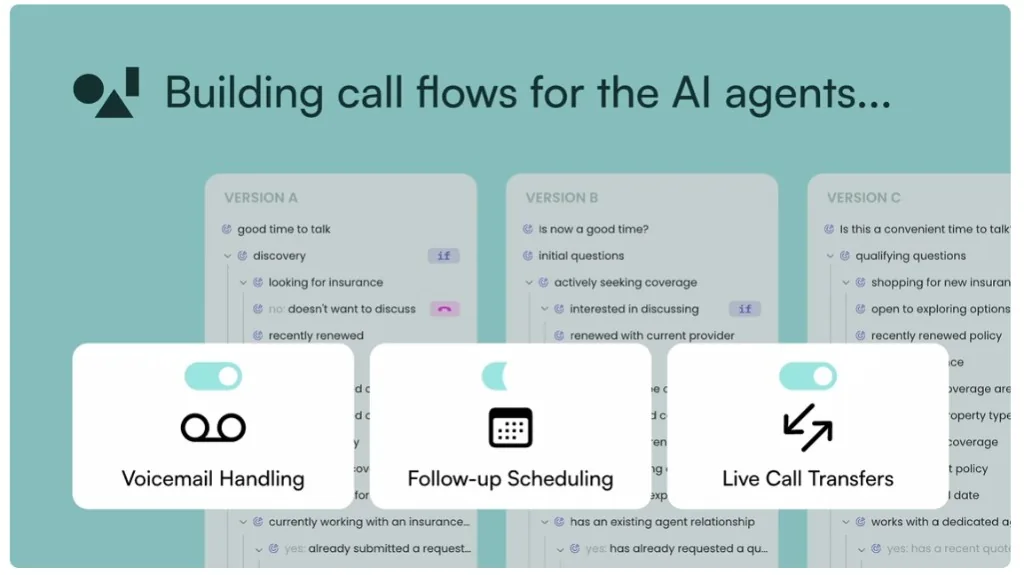
OneAI — Voice agents that update the systems in real time
12
Processes that can become an intelligent flow
- Supplier invoice intake, matched against purchase orders
- Onboarding a new customer across CRM and the core system
- First-line response to service inquiries on digital channels
- Assembling a weekly operations report from several sources
Illustrative examples of the kind of process that fits — not delivered projects.
FAQ
Frequently asked questions
Business automation means turning repetitive manual work into a process the system performs on its own: taking data in, checking it, updating the relevant systems and escalating exceptions to a person. The point is to streamline the business processes that eat hours without adding value. In practice that means engineering and integration work, not installing a single tool.
Work that repeats, follows clear rules, and crosses several systems or several people. Common examples: invoice and document intake, customer onboarding, back office workflows, first-line responses to inquiries, and report generation. The more often it runs and the more predictable its inputs, the faster it pays back. A process rebuilt from scratch every time usually isn't a fit.
Regular automation executes rules written in advance, which works well when the input is uniform and predictable. AI-based automation also handles input that doesn't match the plan: a document in a new format, a request in free language, or a case nobody defined. Most projects combine the two — rules where you need certainty, AI where you need interpretation.
Yes, and that is usually the bulk of the work. We connect through an API, a dedicated integration or an intermediate layer, depending on what the system allows. During discovery we check permissions, update frequency, API limits, record-matching rules and what happens when one of the systems is unavailable. Legacy systems included.
No. In most cases we build a layer on top of what you already run and connect through an API or a dedicated integration. Replacing a system is a separate decision, not a prerequisite.
Yes, and that is usually where it is worth the most. A process crossing several systems, several roles and an approval chain is exactly the case an off-the-shelf tool struggles with. The approach is to break the process into stages, define what runs on its own and what needs a decision, and roll out gradually rather than all at once.
It starts with an AI Process Audit: a working session that maps one process end to end — who is involved, how long it takes, where it jams and where mistakes creep in. You come out with a view of what can be automated, what is better left manual, and in what order. The usual way in is to pick one process with real volume and clear boundaries, put it live, measure it, and only then widen the scope.
It depends on how complex the process is, how many systems have to be connected and how much control is required. The audit produces a grounded estimate before anyone commits to a build — not before.
The repetitive part runs on its own while sensitive decisions and unusual cases go to a person, so the team moves from data entry to oversight. In parallel, at the start of the project we define which data is actually needed, where it flows, who may access it and how long it is retained. Permissions, audit logging and monitoring are part of the build rather than a later addition. Specific regulatory requirements are checked against your own legal and compliance team.
No. We specialize in software- and AI-based automation of business and operational processes: documents, back office, CRM/ERP, customer service, reporting and AI agents. Machine design, industrial controllers (PLC/SCADA) and production-line hardware are a different discipline and not part of this service. If your process starts in a software system or a document, you are in the right place.
Keep reading
- ServiceAI integration for productsThe product side of the same capability: embedding models, agents and MCP inside a product users work with.
- Case studyCase study: OneAI — five years of AI, acquired by monday.comA long-term technology partnership: from a language AI and API platform, through chat agents, to a voice AI system — and the 2026 acquisition by monday.com.
Let's talk
Got a process that feels heavier than it should? Let's find out if it's worth automating.
In an AI Process Audit we map the process end to end, find the bottlenecks, and identify what can become a connected, measurable flow — before anyone commits to rolling AI out across the business.
No slide deck. Just one real process of yours.