Service · Mobile App Development
Mobile AppDevelopment
Apps people open every day. And don't delete after a week.
Building an app is the easy part. Building an app people love, return to, and recommend — that's the real story. The difference is in the details: performance, UX, battery life, offline sync, notifications that don't annoy. Every small detail can sink an app.
We build iOS and Android apps — from a first MVP to products running in production today, like Onit, Tory, Dividandy and Planner, shown further down this page with what we built in each. We've learned where the pitfalls are — and how to avoid them.
01 / Where you start
What does the app need to let the user do?
Three situations people come to us in. The first question is different in each — and it sets the scope before anyone talks technology.
02 / What we build
What we build
From B2C to B2B, from e-commerce to AI-powered apps. Every app — tailored to its audience.
03 / Approach
Native, Cross-Platform, or PWA — which fits you?
This is the first question we help you answer. There's no single right answer. We don't push technology — we recommend based on the project.
04 / Apps we built
Apps we built — running in production
Not a logo wall. Four products running in production, with what we built in each and why. Full case studies one click away.
ON-DEMAND · MOBILE
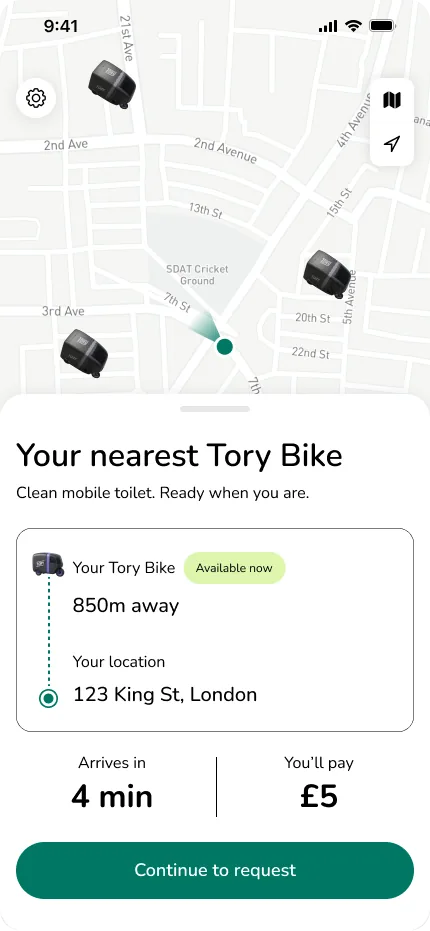
Tory — Mobile services, on-demand.An on-demand mobile services platform that brings the service straight to you.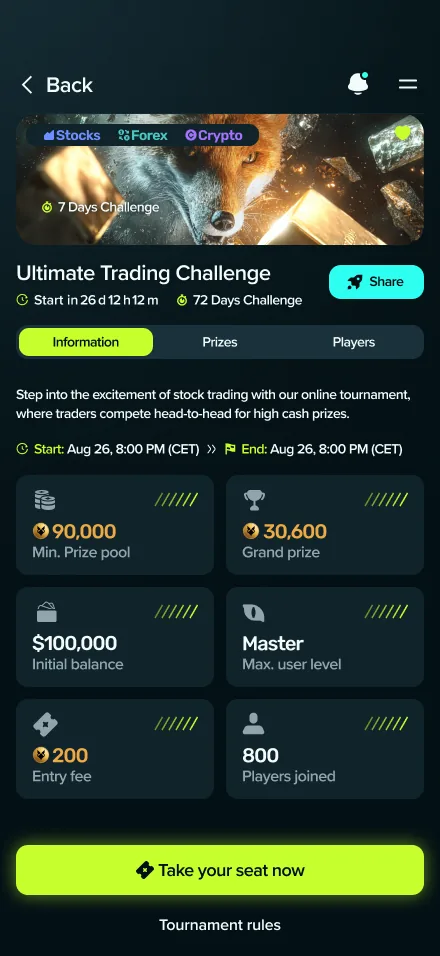
FINTECH · GAMING
Dividandy — Financial markets. As a competitive game.A mobile-first gaming platform that transforms financial markets into a real-time competitive arena: tournaments, virtual capital, live market data and leaderboards.
05 / Technology
Our stack
A full stack — from native iOS to backend to push notifications. We pick the right tool for each app, and we know each of them deeply.
iOS
- Swift
- SwiftUI
- UIKit
- Core Data
Android
- Kotlin
- Jetpack Compose
- Coroutines
- Room
Cross-Platform
- React Native
- Flutter
- Expo
Backend
- Node.js
- Python
- Firebase
- Supabase
Real-time
- WebSockets
- GraphQL Subs
- Pusher
Push & Analytics
- FCM
- APNs
- OneSignal
- Mixpanel
- Amplitude
AI
- OpenAI API
- Claude API
- On-Device ML
- Core ML
DevOps
- Fastlane
- App Center
- TestFlight
- Crashlytics
06 / How we work
How we work
- 01
Understand the product
Who is the user? When will they open the app — coffee in the morning, couch in the evening, on the bus? Every detail shapes the design.
- 02
Mobile-first UX
Mobile isn't a tiny desktop. One hand, small screen, short bursts of attention. We design for the real experience.
- 03
Platform-native design
Material Design for Android, Human Interface Guidelines for iOS. Or a custom design that works beautifully on both. No generic templates.
- 04
Iterative development
Two-week sprints. At the end of every sprint — a live build you can install and try. You don't wait two months to see if it works.
- 05
Testing on real devices
Not just simulators. Real iPhones and Androids, different OS versions, different resolutions. "Works on my machine" doesn't fly on mobile.
- 06
Store launch
We handle the App Store and Google Play submissions. ASO, screenshots, descriptions, responses to rejections. You don't deal with any of it.
- 07
Post-launch maintenance
iOS and Android updates ship constantly. We update, fix, add features. Your app never falls behind.
07 / What a project includes
What you get in an app development project
App quotes are hard to compare when it's unclear what they include. This is the work that makes up a project with us — and what in each row depends on your scope. The binding content of each row is fixed in the scope document agreed before work starts.
| Deliverable | What's included | What depends on scope |
|---|---|---|
| Discovery & requirements | Who the user is, when and how they open the app, what's in version one and what isn't. You leave with an agreed scope before any code is written. | Depth of discovery: an idea without a document needs more joint work than an existing requirements document. |
| Mobile UX & UI | Flows for a small screen and one hand, Material Design for Android and Human Interface Guidelines for iOS, or a custom design that works on both. | Number of screens and states (empty, loading, error) and a dedicated tablet layout. |
| The app itself | Native (Swift/Kotlin), cross-platform (React Native/Flutter) or PWA — based on a reasoned recommendation for the project, not on the technology we find convenient. | One platform or two, offline support, push notifications, camera and location features. |
| Backend, database & API | Most apps need a backend. We build the whole stack — server, database and API — or connect to an existing one. | Real-time, roles and permissions, an admin interface, data volume. |
| Integrations | Notifications (FCM/APNs), analytics, AI services via API or on-device — whatever the product actually needs. | How many external systems, whether they have an API and documentation, and who holds the credentials. |
| Testing on real devices | Real iPhones and Androids, different OS versions and resolutions. An installable build at the end of every sprint. | The device matrix and the test scenarios your audience requires. |
| Store launch | App Store and Google Play submission: ASO, screenshots, descriptions and responses to rejections. The code and store accounts are yours. | Whether developer accounts already exist, and what the organization needs to provide for them. |
| Post-launch maintenance | iOS/Android updates, bug fixes and new features. We agree up front what maintenance covers and what is a follow-on project. | Support scope, response times and whether ongoing development is needed. |
Not sure yet what belongs in version one? We have a filled-in requirements document example, with a file to download.
App requirements document example — downloadable template08 / Guide
What should go into version one of your app?
Before you ask for a quote: a method for deciding what the first version must contain — hypothesis, metric and stop condition — and what can wait for version two.
09 / Who it's for
Who this is for
10 / Why us
Why us
FAQ
Frequently asked questions
There is no honest flat price for an app: the budget follows scope. The drivers are how many roles are involved (design, mobile, backend, QA, DevOps), whether there is a backend and admin, which integrations are in scope, how many platforms, and how much of the requirements exist before we start. We scope the work first, then give a fixed, itemized quote — what is included, what is excluded and what would change the number. A precise number comes after one discovery meeting.
What a requirements document looks like — a filled-in exampleYou don't need a perfect document. It's enough to define in plain language: which problem the app solves, who the users are and what each may do, the main flow from start to finish, and what is explicitly not in version one. We fill in the rest together during discovery. We've published a filled-in example of such a document, with a Word template to download.
App requirements document example — a filled-in template to downloadIt depends on the agreed scope. The orders of magnitude we plan around — not a commitment: a focused MVP with one or two user roles and no complex integrations — 8 to 12 weeks; a medium app with a backend, permissions and integrations — 4 to 6 months; an enterprise project with many roles and systems — 6 to 12 months. The binding schedule is set after discovery and also depends on availability on your side and on your existing systems.
It depends on the project. Most apps get a great result with React Native — at half the time and half the cost. For extreme performance needs, heavy graphics, or deep device feature usage — go native.
Comparison: React Native vs Flutter — which to pick in 2026Great question — not every product needs an app. If there's no recurring use, no offline need, and no push notifications — a responsive site or PWA is enough. We'll tell you straight.
Websites & web systems — when a responsive site is the right answerYou do. No "buts." Your code, your store accounts, everything is yours.
Yes. App Store and Google Play — we handle everything: ASO, screenshots, descriptions, responses to rejections (there's always a first rejection).
Launch isn't the end — it's the beginning. iOS/Android updates, new features, bug fixes, optimization. We stay with you.
Yes. iPad and Android tablets. A proper adapted design — not a stretched phone screen.
Both. Most apps need a backend — server, database, API. We build the whole stack.
Software & systems development — the backend, API and infrastructure behind the appYes. Chatbots, image scanning, smart recommendations, AI agents. Both through external APIs (OpenAI, Claude) and on-device models.
Keep reading
- GuideHow to scope an MVP — what goes in version oneHypothesis, metric and stop condition: a method for deciding what the first version must contain and what waits.
- GuideApp requirements document example — a filled-in template to downloadWhat to define before asking for a quote: users and permissions, flow and states, scope and exclusions, screens with failure states and acceptance criteria. Includes a Word file to work in.
- GuideReact Native vs Flutter in 2026 — what's actually right for startups?Long read: performance, hiring, OTA, scale, web synergy and time-to-market. The pragmatic call for most 2026 startups.
- ComparisonReact Native vs Flutter — which to pick in 2026Cross-platform framework comparison: performance, native module access, maintenance cost, talent pool, and OS updates. Recommendation by product type.
- Case studyCase study: Dividandy — a real-time competitive trading gameA fintech gaming platform: trading tournaments with virtual capital, a simulated engine on live market data, leaderboards, wallet and KYC — on iOS, Android and Web.
- Case studyCase study: Tory — on-demand mobile servicesWe built a client app, a driver app, and a real-time dispatch backend from scratch. Architecture, matching engine, and an order flow measured in seconds.
Let's talk
Got an app idea?
A 30-minute intro call. No strings attached. We'll figure out together if we're a fit.
Straight. To the point. On time.